Trading journal spreadsheet with fees, for Excel and Google Sheets: your real results, after costs
One row per closed trade, or import your MetaTrader history. TrueLedger calculates your net P&L after fees and slippage, explains your numbers, measures your discipline and tells you what to fix.
- Excel & Google Sheets
- No macros
- No subscription
- No account connection required
- Instant download
Secure payment and download through Etsy · DEMO file included
The workflow
One system, from plan to review
The free calculators and the journal use the same inputs and the same formulas: what you plan before the trade is exactly what you analyse after it.
- Plan the trade
Entry, stop, target: the trade scenario. - Size the position
The size that respects your risk, fees included.
→ Open the calculator - Calculate net P&L
Result after commissions, spread and slippage, plus break-even.
→ Open the calculator - Record it in TrueLedger
One row in the journal, or a MetaTrader import.
→ See the journal - Review performance
Dashboard, discipline, cost of mistakes, weekly review.
→ See the journal
The problem
Fees eat part of your gains, and you don't see it
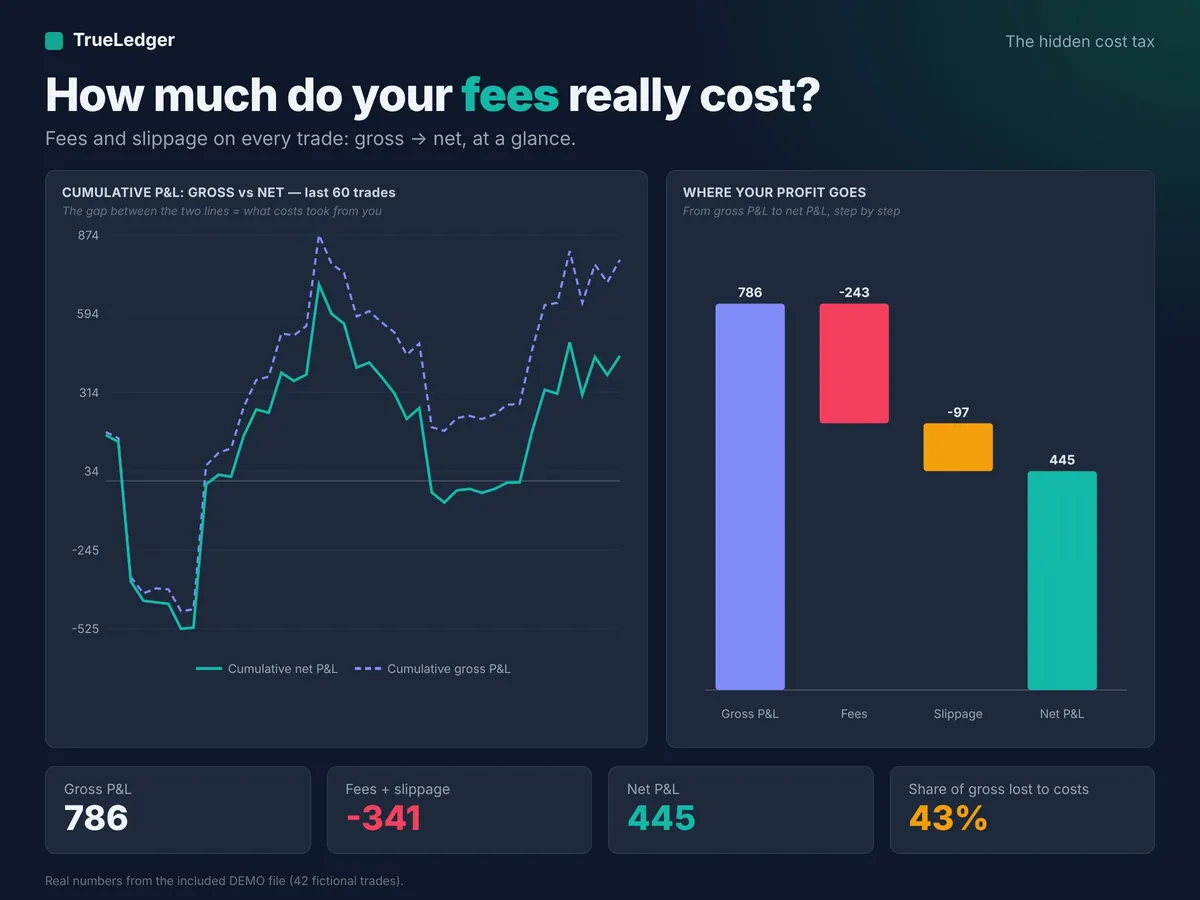
Commissions, spread, slippage, swaps: on most platforms, the result shown trade by trade doesn't tell the whole story. In the DEMO file, costs absorb a large share of gross P&L. TrueLedger calculates everything after costs, so you judge your strategy on what you really keep.
Hidden cost tax
See what fees really cost you
- Gross P&L, costs and net P&L, trade by trade
- Share of gross profit absorbed by fees and slippage
- Trades that were winners before fees and losers after
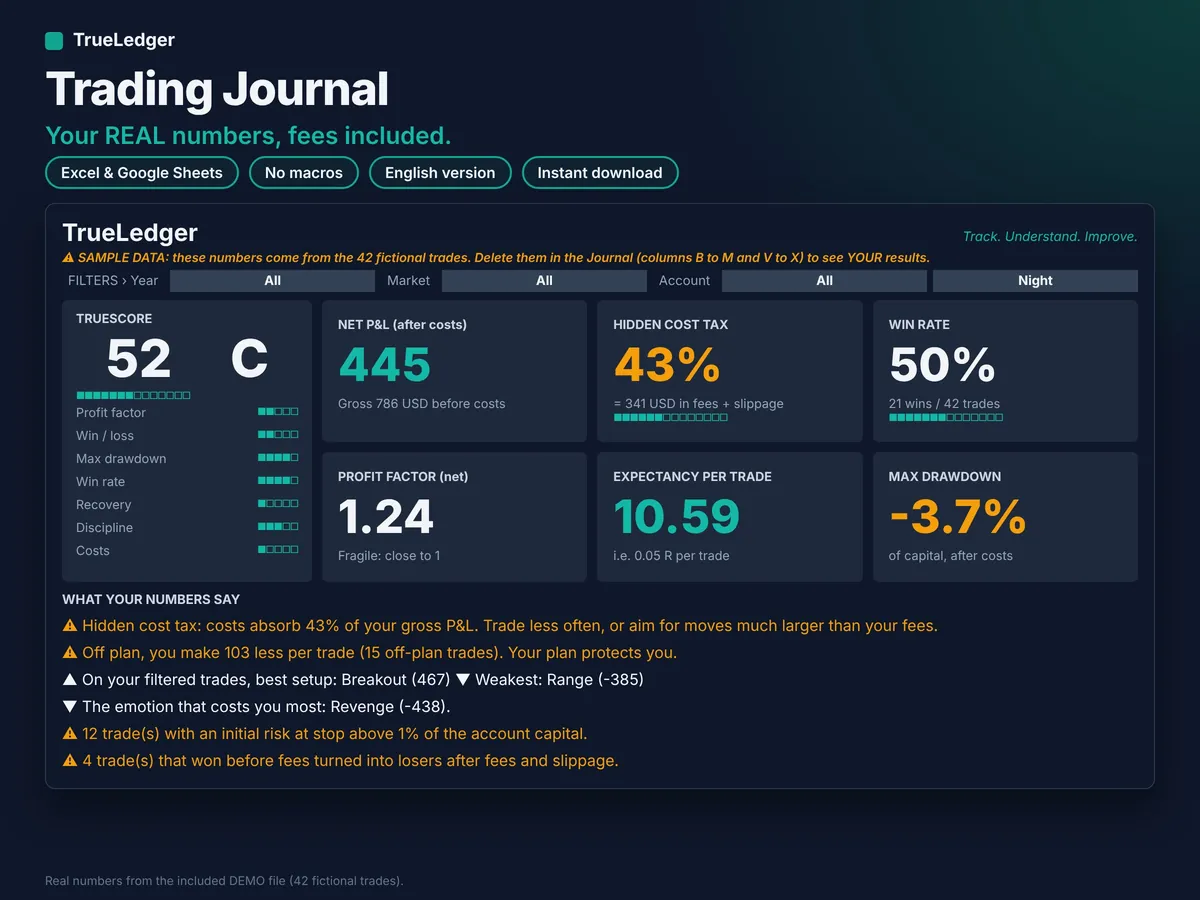
TrueScore and written analysis
A file that talks to you
- Score out of 100: profit factor, win/loss, drawdown, win rate, discipline, costs
- Automatic written analysis: what works, what costs you, what to fix
- Your true edge: results had you followed your plan

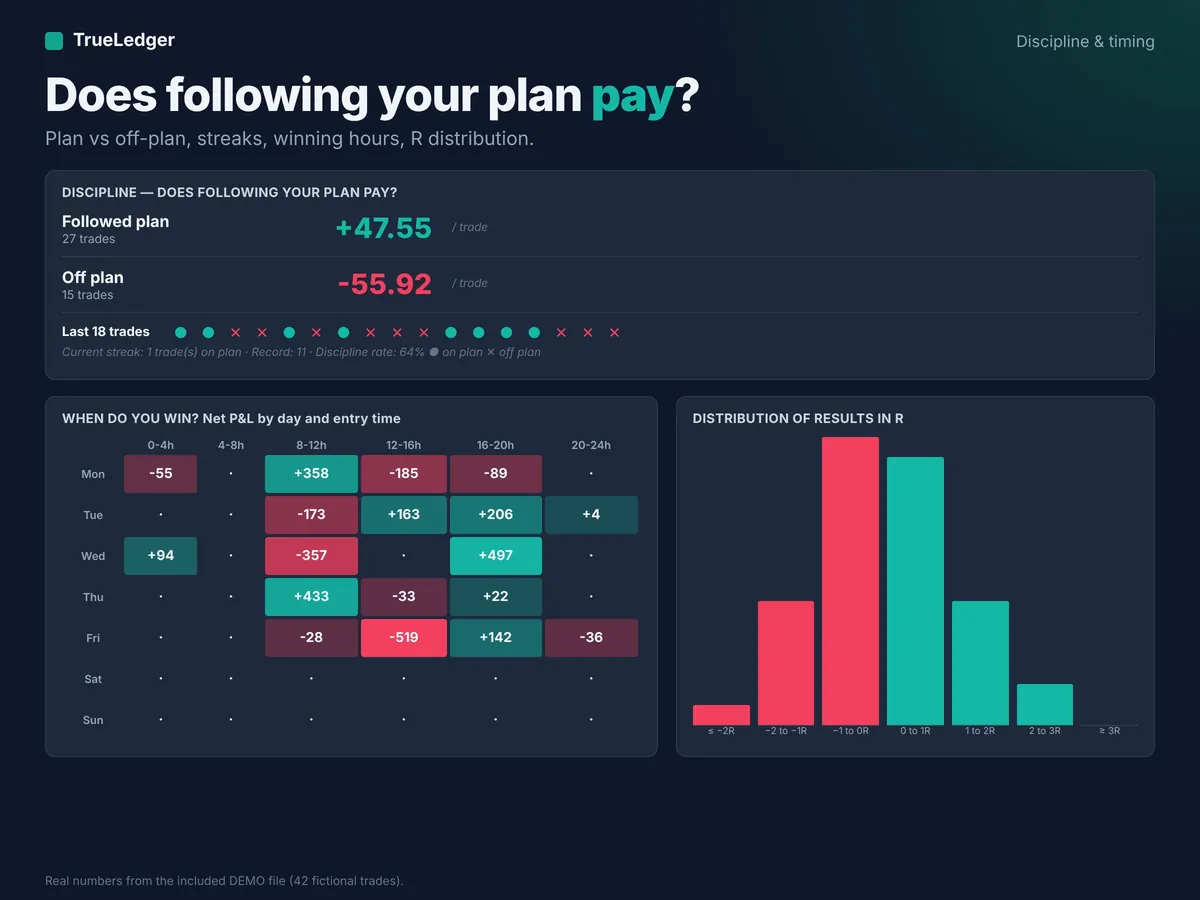
Discipline
Your rules, and what each breach costs
- Max daily loss, max trades, monthly target
- Cost of each mistake and each emotion
- Weekly and monthly review, setup Playbook
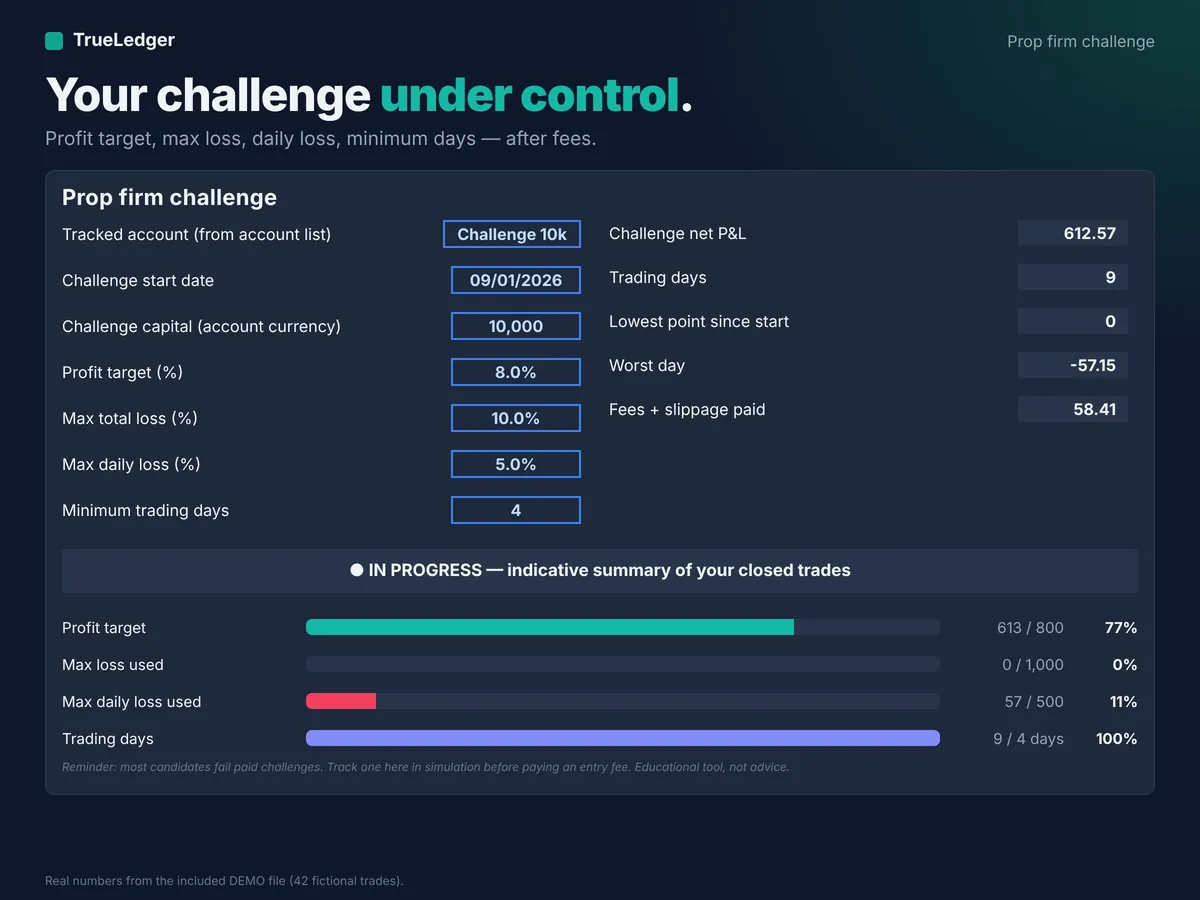
Prop firm
Built-in challenge tracking
- Profit target, max loss, daily loss
- Minimum trading days
- Status of each rule at a glance
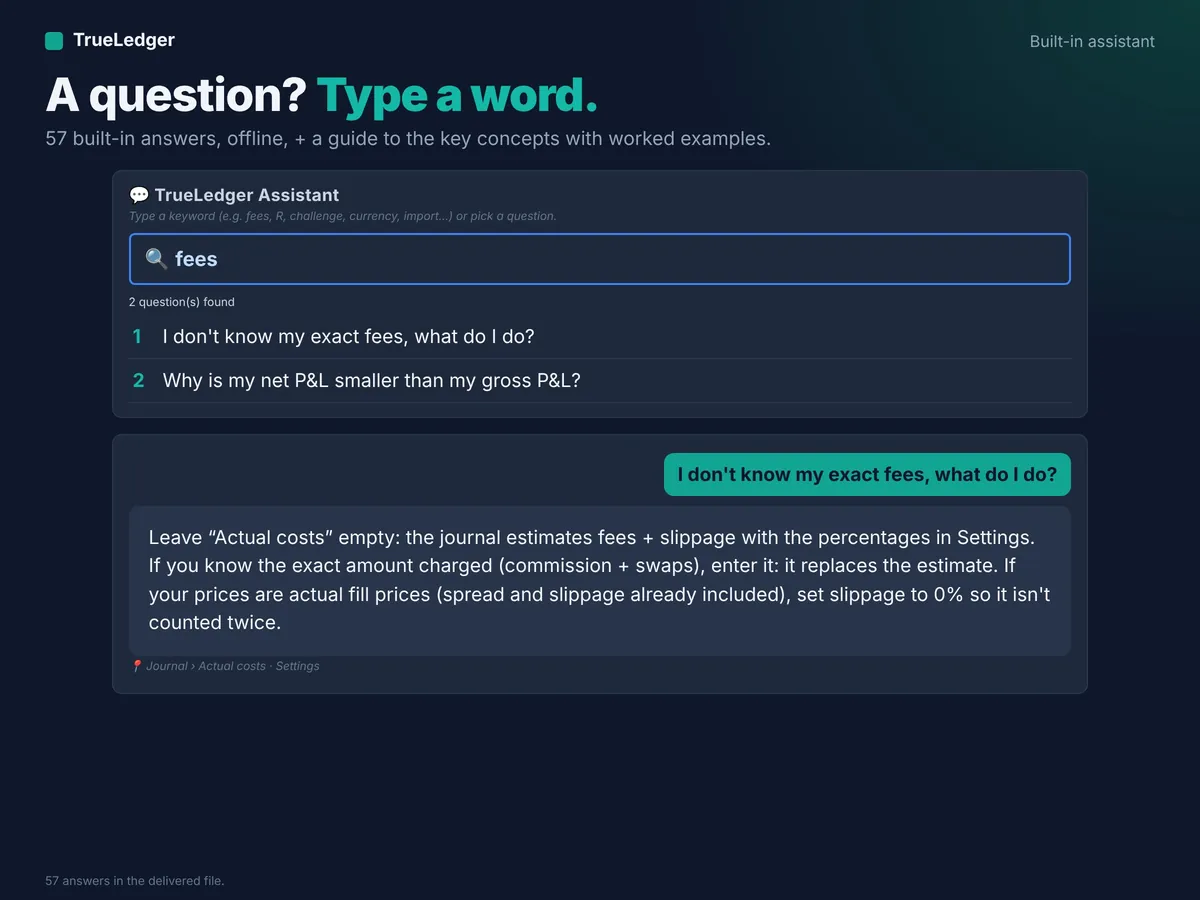
Built-in assistant
A question? Type a keyword
- 57 answers built into the file
- Key-concepts guide, help on every column
- PDF Quick Start Guide included
Everything inside the file
For: crypto, forex, stocks, indices, futures, commodities. 5 colour themes.
Analytics
Long / Short, sessions (Asia, London, New York), markets, holding time, A/B/C grade, progress curves.
Pro analytics
Exit management (MAE / MFE), risk of ruin, Sharpe and Sortino, R distribution, winning hours.
Simulator
Kelly and half-Kelly, projected capital, likely worst drawdown, losing-streak probabilities.
Position size
Calculator for crypto, forex and futures.
Multi-account, multi-currency
Instruments quoted in USD, JPY… converted; futures with expiries (point value, fees per contract); deposits and withdrawals.
MetaTrader 4 / 5 import
In 2 copy-pastes: commissions, swaps and taxes included, duplicates skipped, up to 1,000 trades per pass.
The journal in 14 seconds
Demo: logging a trade, net P&L, dashboard, themes, assistant.
View the journal on Etsy →How it works
- Buy on Etsy and download the ZIP (Account › Purchases and reviews).
- Open the DEMO file (42 sample trades) to explore everything in 2 minutes.
- In the BLANK file, enter your capital and fees in Settings.
- Log your closed trades or import them: the rest is calculated.
In the download
- DEMO file: 42 sample trades
- BLANK file: your journal, 2,000 trades
- PDF Quick Start Guide (Excel / Google Sheets in 5 minutes)
- Free corrective updates on request via Etsy Messages
Compatibility
- Tested on Microsoft 365 (Windows) and Google Sheets (free, with a Google account)
- Built for Excel 2013 and later, Windows and Mac (no functions limited to recent versions)
- Not compatible with Apple Numbers
- First opening in Excel: up to 1–2 minutes (full calculation), then much faster once saved
What it does, what it doesn't
- Calculates and analyses the trades you log or import
- No connection to your trading account: your data stays with you
- Explains your numbers in plain English
- Doesn't connect to your broker or fetch trades in real time
- Gives no signals and no investment advice
- Doesn't work in Apple Numbers
Full details are in the file's "Scope" tab.
Frequently asked questions
Do I need Excel?
No. The file also works in Google Sheets, free with a Google account. It has been tested on Microsoft 365 (Windows) and Google Sheets.
Is there a subscription?
No. You pay once on Etsy and the file is yours. Free corrective updates on request via Etsy Messages.
Does it contain macros?
No macros at all. The file only contains formulas: nothing to enable.
Can I import my MetaTrader trades?
Yes, MT4 and MT5, in 2 copy-pastes: commissions, swaps and taxes are included, duplicates are skipped, up to 1,000 trades per pass.
How many trades can it hold?
The BLANK file holds 2,000 trades.
Is it suitable for prop firm challenges?
Yes: a tab tracks the profit target, max loss, daily loss and minimum days. Always check your firm's exact rules.
Is there a French version?
Yes, the French version is available in the same Etsy shop.
Free calculators
No sign-up, calculated in your browser. The formulas are published in the methodology.
Free guides
Best value
The complete bundle — €59 €82 when bought separately
Add Plan & Risk Manager, Backtesting Tracker, Prop Firm Challenge Tracker: all 4 TrueLedger tools for €59 instead of €82 when bought separately (save €23).
Judge your trading on what you really keep
DEMO file included so you can see everything before logging your own trades.
View the journal on Etsy →